-
Hello folks. I hope you are gonna have a fantastic weekend ahead, as I am bringing you a big update for Captionz! I’m launching Captionz‑ext, an ultra-lightweight browser extension that finally makes dual subtitles on YouTube practical. Thanks to auto‑translate, you can pair almost any language, do quick A‑B repeats, and add community notes, all while you watch.
As you know, dual subtitles have always been my goal. Finally they’re realistic for most videos, which means our second subtitle can finally show up

And the best part: Captionz is completely free. I first thought I’d need AI to translate captions (which would cost money), but YouTube already provides auto‑translate. I just enhance the experience and bring both subtitles together.
Why This Is a Milestone
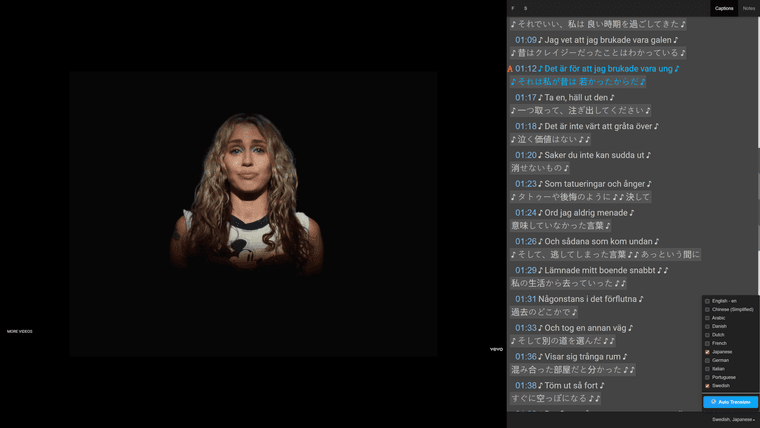
My goal is to help you learn from real videos, like movies, interviews, lectures, and news etc. without losing your flow. I built Captionz‑ext to make dual subtitles practical on most YouTube videos by adding auto‑translate when only one track exists. It also syncs with the Captionz web app for tools like A‑B repeat, notes, and search. Simple setup, more learning.
Free — No Fees
Early on, I planned to use AI to translate captions, which would have meant a paid “pro” plan. Thankfully, YouTube already has auto‑translate. Captionz‑ext simply connects the dots so you can see two subtitles at once. Enjoy Captionz completely free.
What’s New
- Auto‑translate: Turn it on to cover almost any language. If a video has only one caption track, auto‑translate adds the second.
- Dual subtitles: My core goal, now practical on most videos. See two languages at once.
- One‑click access: I added a “Watch on Captionz” button on YouTube video pages.
- Context menu: I added a right‑click menu to open any YouTube link in Captionz.
- Sync with Captionz: Captions flow into Captionz, so A‑B repeat, notes, and Dictionariez work right away.
How It Works
I built Captionz‑ext to read the captions (and auto‑translated ones) on YouTube, then sync them with the Captionz web app. Many videos only include one auto‑generated track, auto‑translate provides the second. Pick your two languages and watch them side by side. No complicated setup, no secret switches.
A Brief History
Five years ago, I launched the first version of Captionz. My debut post on Reddit was a hit: “I made a site that helps you watch YouTube with dual subtitles”.
Back then, I didn’t need an extension. YouTube captions were public; you could request and download tracks, and Captionz could combine languages freely.
Later, YouTube restricted external caption requests. To keep things working, I added a handy button in Dictionariez so users could still open videos on Captionz with dual subtitles — at least for videos that had multiple tracks by default.
A few months ago, YouTube encrypted caption requests, which made access harder. I switched to a simple, privacy‑friendly approach with a lightweight extension and separated Captionz from Dictionariez. That keeps Dictionariez focused and gives Captionz users a stronger, dedicated tool.
And yes: I made Captionz‑ext free and open‑source. High‑fives all around.
Who It’s For
- Learners: Compare native + target language subtitles in real time to build comprehension and confidence.
- Teachers & Tutors: Use any YouTube video for bilingual instruction with A‑B looping and notes.
- Polyglots: Switch language pairs and auto‑translate to explore content across the world.
- Casual Viewers: Understand more, faster—without pausing to look things up.
Quick Start
- Chrome: Install from the Chrome Web Store.
- Edge: Install from Microsoft Edge Add‑ons.
- Firefox: Firefox Add‑ons.
Open any YouTube video and click “Watch on Captionz.” Or right‑click a video link and choose “Open in Captionz.” Pick your two languages, turn on auto‑translate if needed, and you’re set. Your coffee can stay hot; setup is quick.
Manual Installation (Alternative)
- Download the source code from GitHub.
- Go to
chrome://extensions/in your browser. - Enable Developer mode (top right).
- Click Load unpacked and select the extension folder.
Privacy
I aim for minimal, respectful integration. Captionz‑ext only accesses captions needed to enable features and does not collect personal browsing history. Read the privacy policy for details and updates.
FAQs
- Do dual subtitles work on all videos? It depends on captions. Many videos have only one auto‑generated track; turn on auto‑translate to add the second language.
- Which languages are supported? Auto‑translate covers most languages YouTube supports. Dual subtitles work when two tracks exist or one is auto‑translated.
- Do I need the Captionz web app? The extension helps on YouTube and pairs with Captionz for A‑B repeat, notes, and more. Together is best.
- Does this work on Shorts? Not at the moment. Do you really want it to work on Shorts? Comment below to let me know.
- Is it free? Yes — and there are no AI translation fees. Auto‑translate is provided by YouTube; Captionz just enhances the experience.
Call to Action
Install Captionz‑ext (it’s free) and try dual subtitles on your next video:
- Chrome: Captionz – YouTube Dual Subtitles
- Edge: Captionz – YouTube Dual Subtitles
- Firefox: Captionz – YouTube Dual Subtitles.
Open a video you love, turn on auto‑translate to widen language coverage, and use A‑B repeat to nail tricky lines. Add a note or two to help the next learner (or future you).
TL;DR
Captionz + Captionz‑ext = dual subtitles on YouTube—made practical by auto‑translate—plus A‑B repeat and notes, across almost all languages. It’s completely free. Click “Watch on Captionz” and start learning faster. Smiles optional, progress guaranteed.
-
 R river pinned this topic on
-
 Captionz-ext has updated to v1.2.0. Now there is an options page so that you can disable the context menu item on YouTube video link, or hide the "Watch on Captionz" button on YouTube video pages. Also the app icon becomes a quick access toolbar button to open the current YouTube video directly on Captionz.
-
R river unpinned this topic
-
 Captionz Update
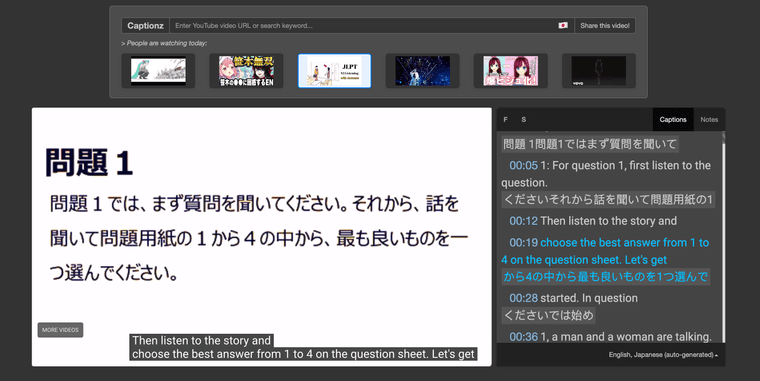
 Just shipped a new feature — you can now browse popular videos by language!

I've been working on making it easier to find content in specific languages, and this update lets you filter popular videos based on the language you want to watch or learn.
For example:
 Learning Swedish? Find trending Swedish videos to immerse yourself in natural conversations
 Studying German? Discover popular German content and pick up everyday phrases
 Into Japanese? Browse top Japanese videos to improve your listening skills
This is especially useful if you're using Captionz to learn a language, as watching popular videos with captions is one of the best ways to pick up vocabulary and get used to how native speakers actually talk.

What's next?
I'm planning to add more language-specific features, like suggesting related videos in the same language so you can keep learning without breaking the flow.Under the hood

I've also upgraded the framework of the site. Captionz is no longer embedded in an iframe, which means better performance, smoother keyboard shortcuts, and a more seamless experience overall. It's a technical change, but you should notice things feeling snappier!Give it a try and let me know what you think!



 Support me!