-
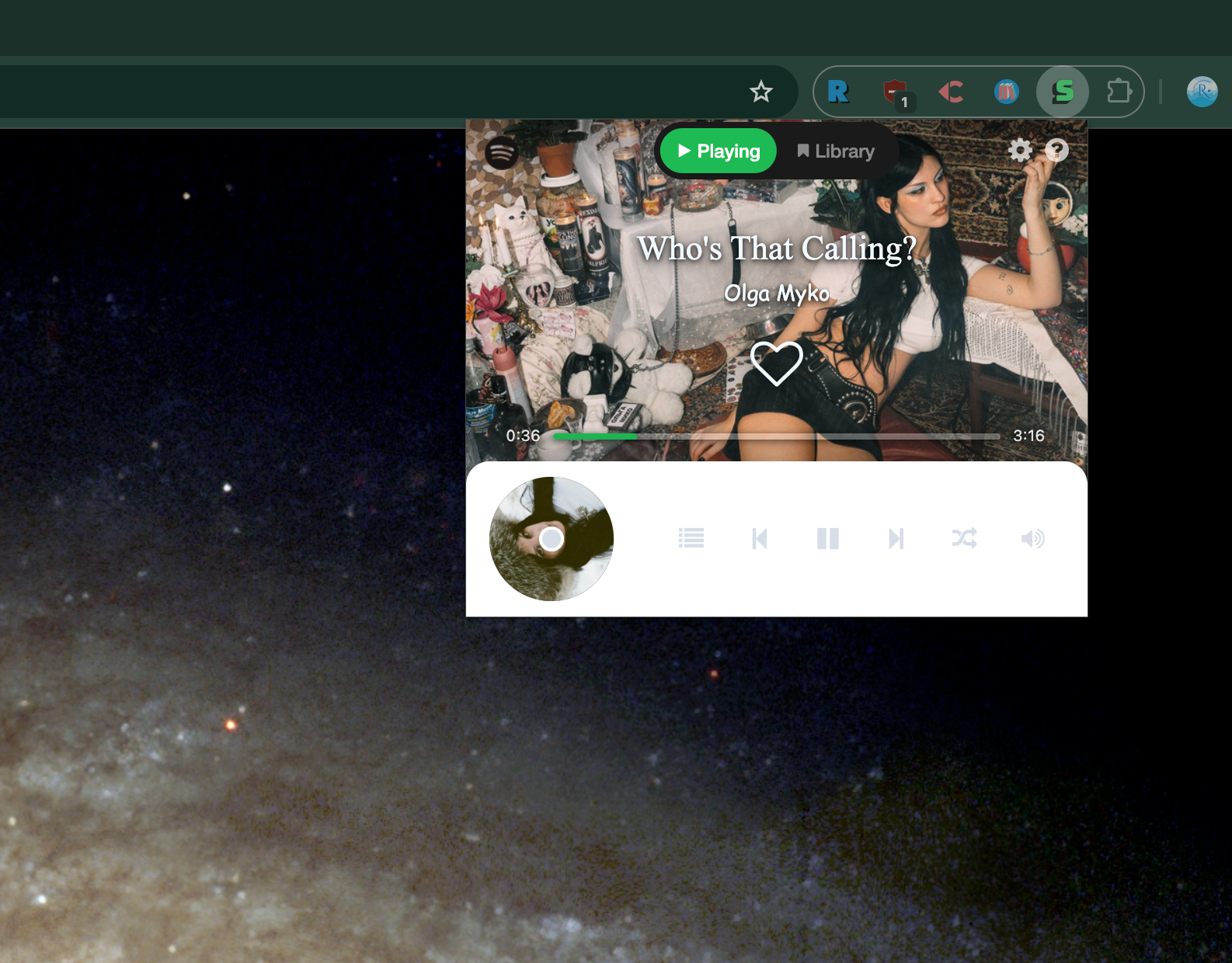
Hello, Spotify fans and language learners! Today, I’m excited (and a little nervous) to introduce the biggest update ever for Spotify on Browser (Chrome, Edge & Firefox as you know). Version 3.0 is here, and it’s not just a facelift, it’s a whole new body!
What’s New?
1. A Larger, Smarter Player
The player is now bigger, brighter, and easier to use. There are more buttons and more features, so you can do more without feeling lost. Everything is clear, friendly, and ready for your music adventures.
2. Seekbar Magic
Who doesn’t want a seekbar when listening to podcasts? Want to skip the boring intro or an ad? Just click and jump! Now you’re in control, not the podcast host.
3. Smart Playback Mode Button
Shuffle mode combined with repeat one mode? Yes, you read that right! With one clever button, you can cycle through shuffle, repeat one, repeat all, or just play normally. I’m pretty proud of this unique design, try it and see how easy playback control can be.
4. Queue and Library Panels
See what’s coming up next, manage your queue, and browse your whole library. Albums, playlists, and podcasts, all in one place. Yes, podcasts work now!
5. Podcast Support
You asked, I listened. Now you can play, pause, skip, and seek podcasts and episodes just like music tracks.
6. Better Shortcuts and Tooltips
Global keyboard shortcuts make it easy to control Spotify from anywhere. Tooltips help you understand every button, even the ones you can’t click right now.
7. Options Page Redesign
The options page is now much friendlier. Set up your shortcuts, read privacy info, and check out other cool projects.
Why This Matters
I made this tool because I use Spotify every day. When I come to the office, I just want to sit down and transfer my playback to my work computer. With Spotify on Browser, it just works, no fuss, no extra clicks. It’s simpler and cleaner than the original Spotify, so I can focus on my work and enjoy my music at the same time.
Behind the Scenes: Hard Work & Magic
This version took a lot of sweat and brainpower. For example, when I tried to add repeat mode, the Spotify API just didn’t cooperate. After testing several methods (and a few cups of coffee), I discovered the magical double-tap strategy, tap the button twice, and repeat mode works like a charm!
Sometimes, building features means fighting with the API, reading docs, and trying creative solutions. But that’s what makes this update special: it’s not just new features, it’s clever fixes and lots of care.
Fun Fact: Spotify Queue & Shuffle
Here’s something funny (or maybe a little annoying): Spotify’s queue doesn’t always shuffle, even when you turn on shuffle mode! That’s why I put the shuffle button in the main controls, not on the queue panel. Some playlists, like your Liked Songs, don’t let you change the shuffle mode at all. It feels like Spotify is just forcing you to listen to its “smart” recommendations.
Have you noticed this too? If you’ve had similar experiences, leave a comment below! Let’s share our Spotify stories.
Thank You!
Thanks for using Spotify on Browser. If you like it, please star the project on GitHub or buy me a coffee. Your feedback and support mean the world!
Ready to try? Update now and enjoy your music (and podcasts) like never before.
If you’re worried about privacy, rest easy! Spotify on Browser does not collect any personal data. For details, check out the privacy policy in the project repository.
Built with
 ️ by River
 -
 R river pinned this topic

 Support me!