How to add a new dictionary to the trove
-
Dictionariez is a language learning browser extension that helps you look up words on any webpage using various online dictionaries. Our community at pnl.dev has contributed hundreds of dictionaries covering many languages, making them available for all users.
We need your help! If you know of useful dictionary websites or language learning resources that aren't yet available in Dictionariez, please contribute them to the community.
What You Can Contribute
We welcome any web-based resources that enhance language learning:
- Online dictionaries (bilingual or monolingual)
- Translation services
- AI Tools (like ChatGPT, Claude, etc.)
- Example sentence databases
- Image search engines (e.g., Bing Image Search)
- Encyclopedia sites (e.g., Wikipedia)
- Pronunciation guides
- And more!
How to Contribute a Dictionary
There are two ways to add dictionaries: contributing to the community (recommended) or testing locally first.
Option 1: Contribute to the Community (Recommended)
This is the best way to share dictionaries with all Dictionariez users.
- Go to the Dictionariez Trove section on pnl.dev
- Create a new topic with:
- Title: The dictionary name (e.g., "Merriam-Webster Dictionary")
- Content: Include the JSON code in a markdown code block (see formats below)
- Tags: Add relevant tags to help categorization (e.g., "English", "Japanese", "Translation", "Google")
Standard Dictionary Format
Use this for most dictionaries that use a URL search parameter.
{
    "dictName": "Merriam-Webster",
    "windowUrl": "https://www.merriam-webster.com/dictionary/<word>",
    "css": "#nav-container { display: none; }"
}
Fields:
dictName: (Required) The display name of the dictionary.windowUrl: (Required) The dictionary's URL. Use<word>as the placeholder for the search term.css: (Optional) Custom CSS to hide unnecessary elements (headers, ads) for a cleaner view.fixSpaceInWords: (Optional) Character to replace spaces (e.g.,"-"converts "New York" to "New-York").
Dynamic / AI Dictionary Format
Use this for AI tools or sites where you need to fill a form (like ChatGPT, Translation sites) instead of using a simple URL.
{
    "dictName": "ChatGPT Definition",
    "windowUrl": "https://chatgpt.com",
    "inputSelector": "#prompt-textarea",
    "submitButtonSelector": "button[data-testid='send-button']",
    "prompt": "Define the word \"<word>\" and provide examples."
}
Extra Fields for Dynamic Dicts:
inputSelector: (Required) CSS selector for the input text area where the word/prompt should be typed.submitButtonSelector: (Optional) CSS selector for the submit/send button.prompt: (Optional) The template text to type into the input.<word>: Replaced by the selected word.<language>: Replaced by the target language.
promptWithContext: (Optional) Use this to provide context to the AI (requires selecting a sentence or enabled features).<sentence>: Replaced by the sentence containing the word.
isRichEditor: (Optional) Set totrueif the input is a content-editable div rather than a standard textarea.
Example Screenshot
Here's how to create a new dictionary topic for "Merriam Webster":
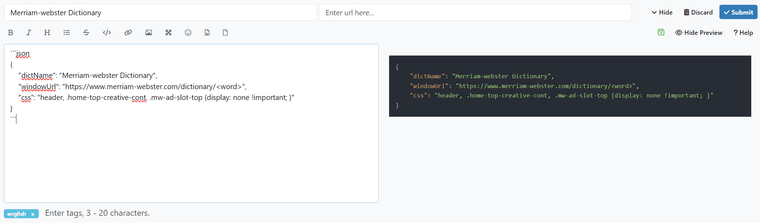
Once submitted, your contribution will be available to all Dictionariez users through the Dictionariez Trove!
Option 2: Test Locally First
Use this method to test a dictionary before contributing it to the community.
- Open Dictionariez and go to the settings/options page
- Press
F12to open the browser's Developer Tools - In the Console tab, run the
addDictcommand with your JSON object:
addDict({
    dictName: 'Google Search',
    windowUrl: 'https://www.google.com/search?q=<word>',
    css: '#searchform,#top_nav {display: none;}'
})
The dictionary will appear at the end of your dictionaries list. Click on it to test it out.
Note: This method only adds the dictionary to your local installation. To share it with the community, follow Option 1 above.
Finding Dictionaries
Browse existing dictionaries and get inspired by what the community has already contributed:
- Visit Dictionariez Trove to see all available dictionaries
- Look for dictionaries in your target languages
- Check out creative uses beyond traditional dictionaries
Your contributions help make Dictionariez better for language learners worldwide. Thank you!
An atypical programmer making apps for educational purpose.
-
hello, thank you for your efforts to make dictionary extension.
can you please add this korean dictionary
https://korean.dict.naver.com/english/main.nhn?sLn=krthis naver dictionary site is better than other naver dictionary url you put in dictionary. thank you.
-
Done. You are right it's better.
-
There are famous Turkish dictionaries on my country. I'll share these sites and search engine URLs that I used any context menu extension. Please add these sites to your extension on next updates.
- KubbeAlti Dictionary: http://lugatim.com/s/{searchTerms}
- Voice Dictionary (Sesli Dictionary): https://www.seslisozluk.net/{searchTerms}-nedir-ne-demek/
- Tureng Dictionary: https://tureng.com/tr/turkce-ingilizce{searchTerms}
- Turkish Language Association (Türk Dil Kurumu): https://sozluk.gov.tr/?kelime={searchTerms}
- Zargan Dictionary: https://www.zargan.com/tr/q/{searchTerms}-ceviri-nedir
-
esdemirei said:
There are famous Turkish dictionaries on my country. I'll share these sites and search engine URLs that I used any context menu extension. Please add these sites to your extension on next updates.
- KubbeAlti Dictionary: http://lugatim.com/s/{searchTerms}
- Voice Dictionary (Sesli Dictionary): https://www.seslisozluk.net/{searchTerms}-nedir-ne-demek/
- Tureng Dictionary: https://tureng.com/tr/turkce-ingilizce{searchTerms}
- Turkish Language Association (Türk Dil Kurumu): https://sozluk.gov.tr/?kelime={searchTerms}
- Zargan Dictionary: https://www.zargan.com/tr/q/{searchTerms}-ceviri-nedir
I found new dictionaries sites. I'll share these below.
- Nisanyan Dictionary (Nişanyan Sözlük): https://www.nisanyansozluk.com/?k={searchTerms}
- What's Dictionary (Nedir Sözlük): https://nedir-sozluk.com/ara/{searchTerms}
NOT: This is alternative search URL. This URL is https://nedir-sozluk.com/anlami/{searchTerms{ | }{ |-}}-ne-demek. If you search compound word thas has 2 and more word this URL gives error. For example “muhabbet kuşu” means that budgerigar in Turkish. You need to use dash (-) instead of space between words. https://nedir-sozluk.com/anlami/muhabbet kuşu-ne-demek gives error but https://nedir-sozluk.com/anlami/muhabbet-kuşu-ne-demek works successfully. - What's, What Means Dictionary (Nedir Ne Demek Sözlük): https://www.nedirnedemek.com/{searchTerms{ | }{ |-}}-ne-demek
NOT: You need to use dash (-) instead of space between words like What's Dictionary. https://www.nedirnedemek.com/muhabbet kuşu-ne-demek gives error but https://www.nedirnedemek.com/muhabbet-kuşu-ne-demek works successfully.
-
It's all done, pal.
You can add to your collection here: https://pnlpal.dev/tags/turkish -
Hello! I tired to add korean russian dictionary but couldn't add any hashtags to post it((
addExtraDict(
{
dictName: 'Korean Russian',
windowUrl: 'https://dict.naver.com/rukodict/russian/#/search?query=%%SS',
css: '#searchform,#top_nav {display: none;}'
}
)This site - https://dict.naver.com/rukodict/russian/#/main
Thanks!
-
Sure. Done here: https://pnl.dev/topic/161/naver-dict-korean-russian/
As for tags, you could choose the already existed ones, or create by yourself.
Also the function
addExtraDictonly exists in settings page of Dictionariez. Here to add a Topic, it should be in the format ofJSON.Anyway, thanks. I am looking forward to more feedback from you.
-
I found new dictionaries sites. I'll share these below.
- Dil Derneği (means “Language Association”): This dictionary's homepage is http://www.dildernegi.org.tr/TR,274/turkce-sozluk-ara-bul.html. But I don't find search engine URL

- Kelimeler.gen.tr (means “Words.gen.tr”): https://kelimeler.gen.tr/sozlukte-ara?q={searchTerms}
- Nedir Ara (means “What is it? Search”): https://nedirara.com/{searchTerms}
- TürkçeSözlük.net (means “TurkishDictionary.net”): https://www.turkcesozluk.net/index.php?word={searchTerms}&sozluk=turkce
- Dil Derneği (means “Language Association”): This dictionary's homepage is http://www.dildernegi.org.tr/TR,274/turkce-sozluk-ara-bul.html. But I don't find search engine URL
-
Sure, I'll add them later
-
Yeah, you are right. http://www.dildernegi.org.tr/TR,274/turkce-sozluk-ara-bul.html is a dynamic website, means the query result is triggered by code without changing the URL. It's not common. But I think I have to figure out a way to support this kind of sites.
The others are added now. Though some sites like "TurkishDictionary.net" or "Glosbe" have a whole bunch of dictionaries that I also need to figure out a way to support them all.
Thanks.
-
Hi River,
thank you for the very serviceable work you are doing. I'm Daniele, an Italian guy working on multilingual projects. I do not know whether this is the best place to make a request, nonetheless, here are the best dictionaries as far as Italian, German and Spanish are concerned. Could you please add them to your list? I wish you all the best for your language learning! 加油! Thanks! -
Hi River, almost forgot, I am trying to use your extension within www.overleaf.com and I think there is some issue, i.e. the option of looking it up doesn't work. Or maybe I am so new to the extension that I am not able to activate it.
-
Hi, thanks for your feedback.
All functions seem OK on overleaf, see:

Could you tell me more specifically?
Also, rae.es is already listed here:
https://pnlpal.dev/topic/56/el-diccionario-spanish
You can add it into your collection.
The other two I will add later. Thanks. -
Hi River,
thank you for the swift reply.
Actually you are right, on the right side (the pdf rendering of the text on the left) the dictionaries work properly.
I was trying to make it work on the left in order to be able to look up words using the comment feature of overleaf, thus looking up words absent from the actual text, but pertaining to the original.
Now I see that even there, right-clicking on a word it does open a Firefox menu, only, the word is not copied there (I do not know if it is meant to be) and searched, the search window is empty.
However, to do so I can go to a tab where I have a dictionary open!
Another very good German dictionary is: https://www.dwds.de
Thank you for the good work,
Daniele -
Now I see the issue, you are right about this. I'll look into it. Thanks.
-
Hi, sorry for the delay.
Finally all those dicts have been added in dictionariez-trove.
Please help me review them, see if they suit your purpose?
Thank you. -
Hi River,
my turn to apologise. I could look into it only today. All dictionaries work fine in the fairy dict. I will get back as soon as I can do more testing. Thanks a lot! Good work!
Daniele -
Great. Thank you.
-
On Firefox, I just can't get the user selected text by code in an editable element, like an ACE editor. It seems a bug of Firefox.
But on Chrome, it all works fine. You can get the selected text of the editor of overleaf.com.
I'll tell you if I find a solution.



 Support me!